
Migos Hotel Lobby AI Video Generator
Upload two photos and the Hotel Lobby AI video generator puts both of you in the orange booth, trading verses at one hanging microphone. You get a 15-second vertical video with sound in about a minute. It works as a Migos AI video generator for the trend on TikTok and Reels, with no prompt or editing needed.
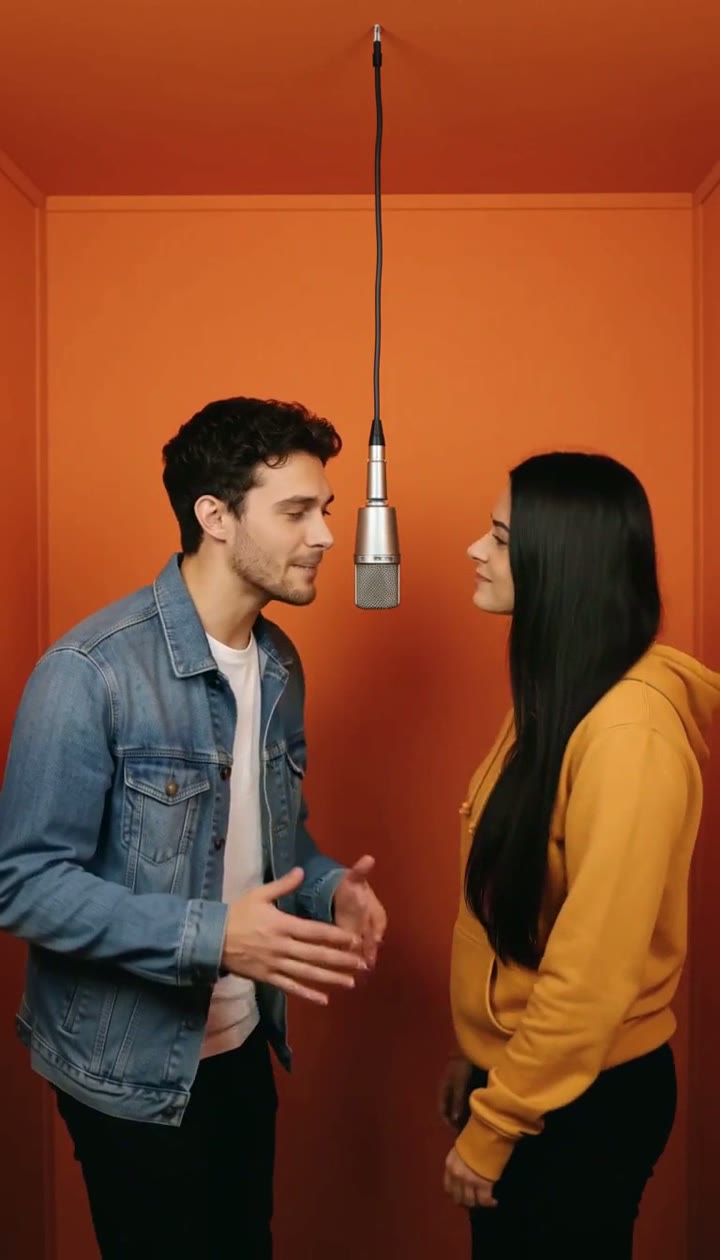 TAKE 02TAKE 03
Recent Hotel Lobby AI Videos
A Hotel Lobby AI video usually takes about a minute: the booth scene is built from your two photos first, then the 15-second performance is rendered.
Migos Hotel Lobby AI Video Generator
Drag image here, click to browse, or paste from clipboard
Max size: 5MB
Drag image here, click to browse, or paste from clipboard
Max size: 5MB
At a glance
Verified Sep 2026- Input
- Two photos, one subject each · people, pets or characters · JPG, PNG or WebP up to 5 MB
- Output
- MP4 with sound · 480p / 768p · vertical 9:16
- Length
- 15 seconds, one continuous take
- Render time
- About a minute
- Price
- 166 (480p) · 256 (768p) credits per video
- Watermark
- None
Recent Hotel Lobby AI Videos
See what you can create - Sign in to start generating your own videos
Hotel Lobby AI Video Examples
Two friends, two cats and a pair of grandparents, each built from two ordinary photos. Tap a clip to play it with sound.
About the Hotel Lobby AI trend
The Hotel Lobby trend, also called the Migos or rap duo trend, recreates Quavo and Takeoff's orange-booth COLORS performance with two other people. This page builds that booth from your two photos and plays a 15-second duet to the trend's track, so you get a vertical video that is ready for TikTok, Reels or Shorts without filming anything.
Ideas people try
Best friends
Put two friends in the booth, even if the photos were taken in different cities.
Couples
Swap the rap for a sweet anniversary post: one selfie each, one booth.
Birthday surprise
Put the birthday person next to their best friend and post it as the party opener.
Pets and family
Two pets or two grandparents in the booth tend to get the most replies.
Tips for a better result
- Use one face per photo. Each upload should show one person, front-facing and well lit. The first photo stands on the left, the second on the right.
- Match the framing. Two upper-body photos of a similar size blend most naturally; tiny faces from group shots can drift.
- Pick the tier. Standard is quicker and cheaper; HD is sharper for faces. Both are 15 seconds and 9:16.
- Mind the rights. Only use photos of people who agreed to be in the video, and label the post as AI-generated.
How to Make the Hotel Lobby AI Video
- 01
Upload Two Photos
Add one photo for each performer. The first photo takes the left side of the microphone and the second takes the right. Clear, front-facing photos with one subject each work best; people, pets and characters are all fine.
- 02
Generate the Booth Performance
Click generate. The Hotel Lobby AI video generator places both subjects in the orange booth with a hanging microphone, then animates a 15-second rap duet in one continuous take.
- 03
Download and Post
Download the vertical 9:16 video with sound and post it to TikTok, Reels or Shorts. Add the trend's sound in the app and label the post as AI-generated.
Migos Hotel Lobby AI Video Generator FAQ
Q01What is the Hotel Lobby AI trend?
Q02How do I make the Migos Hotel Lobby AI video?
Q03Can I use pets or cartoon characters in the Migos AI video?
Q04Does the Hotel Lobby AI video have sound?
Q05Is this an official Migos or COLORS tool?
More effects to try
Make Your Migos Hotel Lobby AI Video Now
Two photos are all it takes to put any duo in the orange booth. Try the Hotel Lobby AI video generator and join the Migos AI trend in about a minute.
No watermark. 15-second vertical video with sound.